 Install on Shopify
Minimum Order Quantity
Never ship an unprofitable single-unit order again.
Short answer
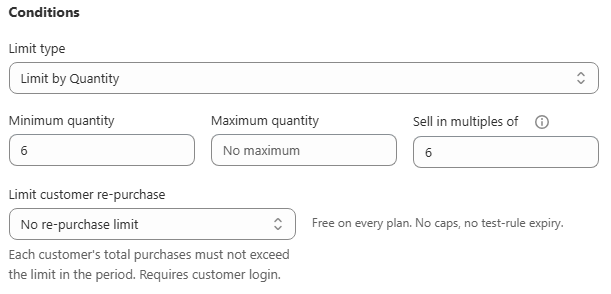
A minimum quantity rule blocks checkout unless the cart contains at least the number of units you set. In the Conditions card you set Limit type to Quantity and fill in Minimum quantity, leaving the other fields blank if they do not apply. Whether each product must reach the minimum on its own, or several products can add up to it, is decided separately in the How to count card. This is the classic MOQ, and the quick-start tile creates the same rule pre-filled with a minimum of 6.
- Set Limit type to Quantity and fill in Minimum quantity. Everything else stays optional.
- How to count decides whether the minimum applies per product or across the whole matching cart.
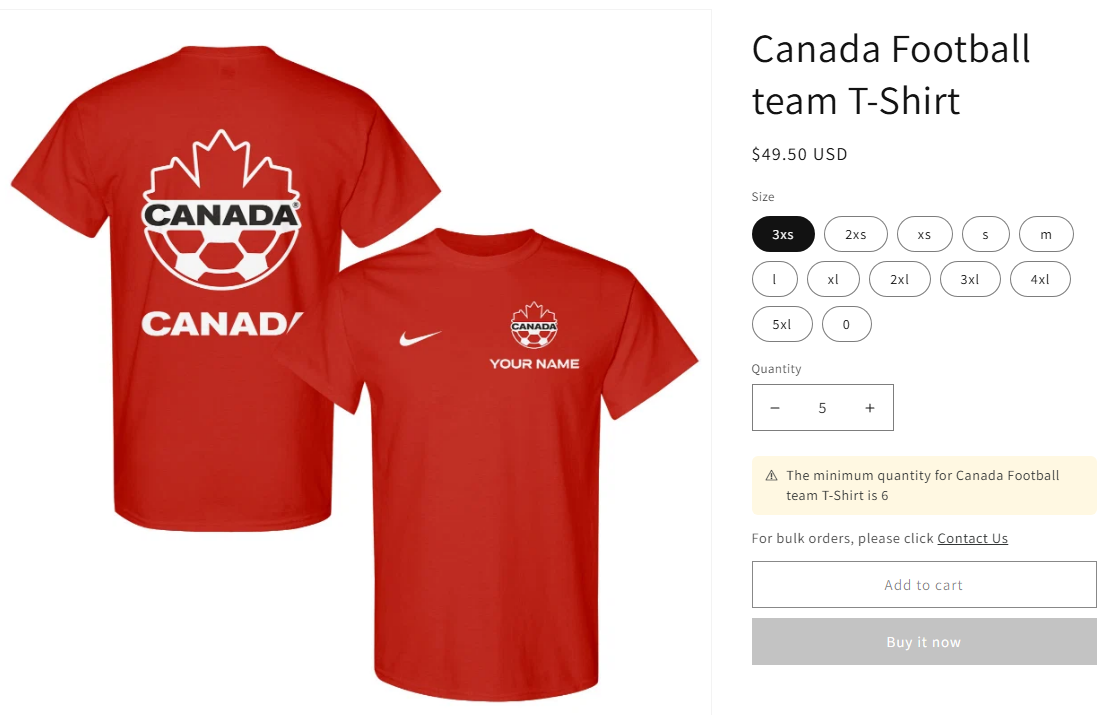
- The product page warns as soon as a disallowed quantity is set, and checkout is what actually blocks.
- A rule matching zero products is never enforced, whatever its saved status says.
Inside the app
Real screens from Prime MOQ · Order Limits.
What you get
Protect margin on low-priced items
Require at least 6 units so payment fees, packaging and pick-and-pack time do not eat the whole profit on an order.
Enforce a supplier-style minimum
"This item is only sold in orders of 12 or more" becomes a real gate instead of a line on a policy page.
Push average order value up
A small store-wide minimum, such as 2 counted as a combined total, lifts AOV without annoying single-item shoppers.
Clear inline messages
Shoppers read "The minimum quantity for {{product_name}} is {{minimum_quantity}}" instead of hitting a silent failure.
How it works
- 1Start from the Minimum quantity (MOQ) quick-start tile, or go to Rules > Create rule and set Limit type to Quantity.
- 2Enter your number in Minimum quantity and leave Maximum quantity and Sell in multiples of blank unless you need them.
- 3Choose how to count: Each item separately if every SKU must meet the floor on its own, Combined total for a mix-and-match minimum.
- 4In the Products card, scope the rule to specific products, a collection, tag, vendor, product type or your entire store.
- 5Optionally rewrite the Minimum limit message, then save. The rule enforces immediately.
How it is enforced
The rule compares the quantity of matching products in the cart against Minimum quantity. If the cart holds fewer units, checkout is blocked and the shopper sees your minimum limit message. What counts as a matching product, each item on its own or all matching items added together, comes from the How to count card, not from the condition itself.
Verify it works
In the rule editor's Preview card, drag the quantity stepper below your minimum and confirm the warning reads correctly. Then add fewer than the minimum to a cart on the live storefront and confirm both that the message appears on the product page and that checkout is genuinely blocked, not just warned about.
| Cart | Expected result |
|---|---|
| 1 unit, below a minimum of 6 | Blocked, limit message shown, checkout stopped |
| 6 units | Allowed |
| 6 units plus one non-matching product | Only the matching units count toward the minimum |
Common mistakes
- Nothing blocks even though the rule is Active: check the product scope really includes the product you are testing. A zero-match rule is never enforced.
- The minimum applies across several different products when you wanted it per product: set How to count to Each item separately.
- The message does not show on the product page: the app embed is most likely not enabled in your theme yet.
Frequently asked questions
- Does a minimum stop add to cart, or only block checkout?
- It blocks checkout. The product page shows the limit message as soon as a disallowed quantity is set and the Add to cart button is disabled, but the enforcement that cannot be bypassed happens at checkout.
- Can I set a store-wide minimum order quantity?
- Yes, choose All store as the Products scope. Be careful with counting: a store-wide minimum of 6 counted per item means every single product in the cart needs 6 units. Combined total is usually the right choice.
Best for
Wholesale, trade and any brand losing margin on tiny orders.
Want a walkthrough of this rule?
We'll set it up live on your catalog in 30 minutes.