 Install on Shopify
Prime MOQ Demo Store: Order Limits for Shopify

Sell in the quantities
your operation actually ships.
Minimums, maximums, pack multiples and cart-value limits, enforced on the product page, in the cart and at checkout, per customer tag. Try it on the products below.
- Rule levels
- 4
- Customer groups
- Unlimited
- Theme edits
- None
The catalog
Every product carries a rule.
Change the customer group to see the same catalog behave differently, exactly like tag based rules in the app admin.
Simulate customer group
This storefront is a live demo of every order limit feature.
Every stepper, warning and cart threshold you see on Lumière is the actual Prime MOQ engine enforcing rules on a real Shopify store.
Minimum Order Quantity
Set a quantity floor per product, variant or collection and block anything below it.
Explore feature details →Maximum Order Quantity
Cap how many units a customer can buy per line, per product or per order.
Explore feature details →Pack Multiples & Increments
Force quantities to step in packs of 3, 6, 12 or any increment you sell in.
Explore feature details →Cart Value Limits
Require a minimum cart amount, and optionally a ceiling, per customer group.
Explore feature details →Per Item vs Combined Total
How to count decides if a limit is checked per product or across all matching products.
Explore feature details →Customer Eligibility & Countries
Scope any limit to customer tags, Shopify segments, named customers or countries.
Explore feature details →One Rule Per Product
A product is governed by one active rule at a time, resolved automatically.
Explore feature details →Coverage & Rule Overrides
Live coverage per rule plus automatic override detection when a more specific rule wins.
Explore feature details →Automations & Shopify Flow
Two triggers, three actions and four ready-made workflows you install into Shopify Flow in one click.
Explore feature details →Blocked Order Alerts
Instant email when a big cart is blocked, plus a daily digest of the small ones. Set it up in Settings.
Explore feature details →Import, Export & API
Export and import rules as JSON or CSV, and manage API keys for programmatic access.
Explore feature details →Stock-aware Maximum
Use live inventory to set per-variant maximums, with keep-back buffers and fallback actions when stock runs low.
Explore feature details →Limit Messages & Design
Per-rule message text with placeholders, plus one global storefront style.
Explore feature details →Checkout Enforcement
Enforcement runs inside Shopify's checkout validation, so it cannot be bypassed.
Explore feature details →Targeting Products & Collections
One scope per rule: products, collections, tags, vendors, types or all store.
Explore feature details →Scheduled Rules & Statuses
Give any rule a start and end date, and read its real effective status.
Explore feature details →Weight Limits & Freight
Block checkout on the physical constraint that actually matters for freight.
Explore feature details →Shop Metafield Conditions
Use Shopify shop-level metafields as the live source for quantity, value and weight limits.
Explore feature details →Inside the app
This is the admin behind this store.
Real screens from Prime MOQ · Order Limits. Every rule you can feel in the catalog above is set up in a few fields here.
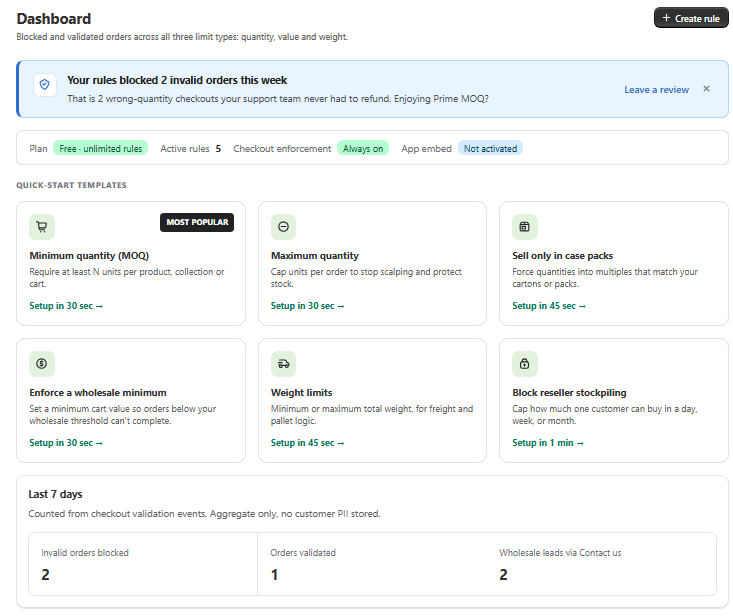
Every blocked order in one place
Quick-start templates get a rule live in under a minute, and the 7-day counters show how many wrong-quantity checkouts never reached your support inbox.
How enforcement works
Four steps between a messy order and a shippable one.
- 01
Set a rule
Pick products, collections, variants or the whole store, then define min, max, multiple and cart-value limits.
- 02
Scope it to a group
Target customer tags, B2B companies, markets or logged-out visitors. Rules stack with clear priority.
- 03
Enforced everywhere
Quantity pickers snap to valid values, the cart explains blockers, and checkout stays locked until the order is valid.
- 04
No theme edits
The app script embeds itself through app blocks, so nothing breaks when you switch themes.
Before / after
What changes on day one.
Without the app
- A retail shopper buys 1 unit of a case-only item
- Wholesale buyer checks out with $60 instead of the $600 minimum
- Someone clears your stock of a limited serum in one order
- Odd quantities break your packing and shipping labels
- You edit theme code for every new rule
With Prime MOQ
- Quantity picker starts at the case size and steps in 6s
- Cart shows exactly how much is missing and blocks checkout
- Per-customer maximum caps the line at 3 units
- Multiples keep every order aligned to real pack sizes
- Rules change in the app admin, storefront updates instantly
Merchant feedback
Built with wholesale merchants.
“Our packing errors dropped to zero once every order had to come in case multiples. Setup took an afternoon.”
“We run retail and wholesale on one store. Tag-based minimums finally made that work without a second storefront.”
“Limited drops stay fair now. Three per customer, enforced in the cart, no manual cancellations.”
Pricing
Everything unlimited on Free.
What other order limit apps put behind a paid plan is included in our free plan with no caps. Pro only adds automation extras like metafield-driven limits, Flow triggers and reporting.
Free
Features
- Unlimited rules
- All 3 limit types
- Multiples and repurchase limits
- All product scopes
- Customer tags and countries
- Scheduling
- Per-language messages and design presets
- Contact-us lead button
Pro
or $134.91/year and save 25%
Everything in Free, plus
- Metafield-driven limits
- Rules read min, max and pack size
- One rule covers thousands of SKUs
- Inventory-aware maximums
- Shopify Flow triggers
- Email alert when a large order is blocked
- Blocked-order value reports and CSV
- Rules import-export and API
7-day free trial
All charges are billed in USD. Recurring and usage-based charges are billed every 30 days.