 Install on Shopify
Weight Limits & Freight
Cap or require total shipping weight, in lb, oz, kg or g.
Short answer
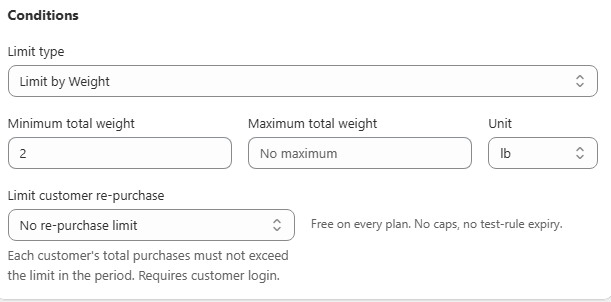
A weight rule blocks checkout unless the total weight of matching products in the cart meets a minimum, stays under a maximum, or both, measured in lb, oz, kg or g. You set Limit type to Weight. The check reads the weight field on each product or variant in Shopify, so a product with no weight silently counts as zero, which makes auditing your product weights the real first step.
- All four Shopify weight units are available, so you can match how your products are weighed.
- Weight rules read the Shopify weight field. A missing weight is treated as zero.
- Combined total is the usual mode, since a weight cap is a shipment-level constraint.
- Switching the unit does not convert a number you already entered, in either direction.
Inside the app
Real screens from Prime MOQ · Order Limits.

What you get
Freight and LTL logic
Only allow orders once the total weight qualifies for your carrier's minimum shipment.
Pallet-based shipping
Cap an order at the maximum weight one pallet configuration can safely carry.
Heavy-goods minimums
Require a minimum weight so a shipment is worth dispatching at all.
Country aware
Pair a weight rule with the Countries field so it only applies in the shipping zones where it makes sense.
How it works
- 1Audit product and variant weights in Shopify first. A missing weight counts as zero.
- 2Create the rule and set Limit type to Weight.
- 3Choose the unit, lb, oz, kg or g, then enter minimum total weight, maximum total weight, or both.
- 4Leave How to count on Combined total, since weight is a shipment-level constraint.
- 5Scope the products, optionally restrict countries, and save.
Product weights have to be right first
The check relies entirely on the weight field on each product or variant in Shopify. Anything with a blank weight contributes zero to the total, so a maximum-weight rule built for freight decisions is only as trustworthy as your catalogue data.
Common weight setups
Weight rules replace the guesswork in freight-sensitive catalogues where neither unit count nor money value is the real constraint.
| Goal | Setup |
|---|---|
| Carrier minimum shipment | Minimum total weight, combined total |
| Single pallet cap | Maximum total weight, combined total |
| Region-specific freight | Weight rule plus Selected countries |
Common mistakes
- Trusting a weight cap while some variants have no weight set.
- Changing the unit and expecting the number you already typed to convert.
- Choosing Each item separately, which checks every line's weight on its own instead of the shipment total.
Frequently asked questions
- Which unit should I use?
- Whichever your products are already weighed in inside Shopify, since the rule reads that field directly.
- Can I combine weight with a quantity rule on the same products?
- One rule governs a product at a time, so pick the harder physical constraint, usually weight, and express the other through your catalogue structure.
Best for
Freight-sensitive catalogues, pallet shipping and heavy goods.
Want a walkthrough of this rule?
We'll set it up live on your catalog in 30 minutes.