 Install on Shopify
Stock-aware Maximum
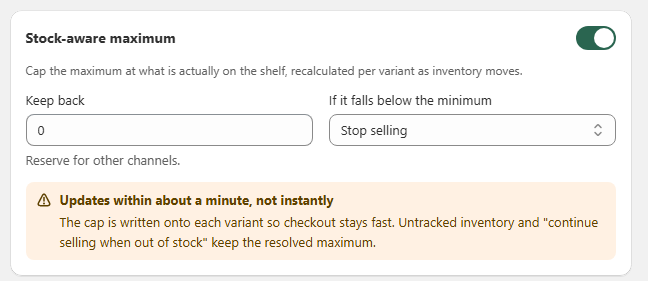
Cap the maximum at what is actually on the shelf, recalculated per variant as inventory moves.
Short answer
Stock-aware maximum links a quantity or cart-value rule to the real inventory count of each variant. Instead of setting a fixed maximum, you let Prime MOQ cap the maximum at what is actually available, minus any stock you want to keep back for other channels. The cap is rewritten onto each variant about once a minute, so checkout stays fast and the shopper always sees the current limit.
- Cap the maximum at live inventory per variant, recalculated as stock moves.
- Keep back a fixed number of units to reserve stock for retail, POS or other channels.
- Choose what happens when inventory falls below the rule minimum, such as stopping sales.
- Updates run about once a minute, not instantly, because the cap is written onto each variant for speed.
- Untracked inventory and products set to continue selling when out of stock keep their resolved maximum.
Inside the app
Real screens from Prime MOQ · Order Limits.
What you get
Live inventory cap
Each variant's maximum is capped by the inventory quantity Shopify reports, so you never oversell through the rule.
Keep-back buffer
Reserve units for other channels by entering a keep-back number. The cap becomes available inventory minus the buffer.
Below-minimum action
Decide what happens when stock drops under the rule minimum, such as stopping sales for that variant.
Fast checkout
The resolved cap is written back to the variant, so storefront and checkout checks stay fast.
How it works
- 1Open the rule editor and turn on the Stock-aware maximum toggle.
- 2Enter a Keep back value to reserve stock for other channels, or leave it at 0 to use all available inventory.
- 3Pick what happens If it falls below the minimum, such as Stop selling.
- 4Save the rule. Prime MOQ recalculates the cap per variant about once a minute.
- 5The cap is written onto each variant, so product pages, cart and checkout enforce the current limit without extra API calls.
Why updates take about a minute
The cap is written onto each variant so checkout stays fast. That means Prime MOQ updates the resolved maximum on a schedule rather than reacting to every inventory change in real time. For most stores, a delay of about a minute is a good balance between freshness and performance.
Keep back and below-minimum behavior
Keep back reserves inventory for other channels. If available inventory minus keep back falls below the rule minimum, the chosen fallback applies. Stop selling is the safest default for wholesale rules where partial fulfilment is not acceptable.
| Setting | Effect |
|---|---|
| Keep back | Units reserved and excluded from the cap |
| Stop selling | Variant becomes unavailable when stock falls below the minimum |
| Continue selling when out of stock | Keeps the resolved maximum even if Shopify inventory shows zero |
What keeps the resolved maximum
A few Shopify settings override or preserve the cap:
- Untracked inventory is treated as available, so the cap stays positive.
- Products set to continue selling when out of stock keep their resolved maximum even at zero inventory.
- Manual inventory edits in Shopify are picked up on the next recalculation cycle.
Common mistakes
- Expecting instant updates after a sale. The cap refreshes about once a minute.
- Setting a keep-back value higher than average inventory, which leaves nothing for the rule to sell.
- Forgetting to choose a below-minimum action, leaving the default that may not match the business rule.
- Mixing stock-aware maximum with a fixed maximum and not realising the lower of the two wins.
- Ignoring the warning and blaming oversells on Prime MOQ during the one-minute refresh window.
Frequently asked questions
- Where do I turn on stock-aware maximum?
- Inside the rule editor, in the condition card that sets the maximum. The toggle is labelled Stock-aware maximum.
- How often does the cap update?
- About once a minute. The cap is written onto each variant so checkout enforcement stays fast.
- What does Keep back do?
- It reserves a fixed number of units for other channels. The cap becomes available inventory minus the keep-back amount.
- What happens when stock falls below the minimum?
- It depends on the action you pick, such as Stop selling. That action is applied per variant.
- Does this work with untracked inventory?
- Yes. Untracked inventory and products set to continue selling when out of stock keep their resolved maximum.
Best for
Merchants who sell the same SKU through wholesale, retail and POS channels and need the maximum to follow real shelf stock.
Want a walkthrough of this rule?
We'll set it up live on your catalog in 30 minutes.