 Install on Shopify
Checkout Enforcement
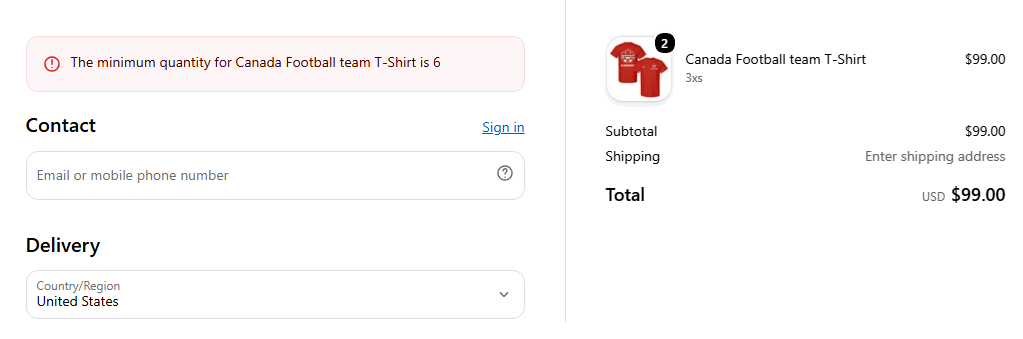
A Shopify Function blocks the order, not storefront JavaScript.
Short answer
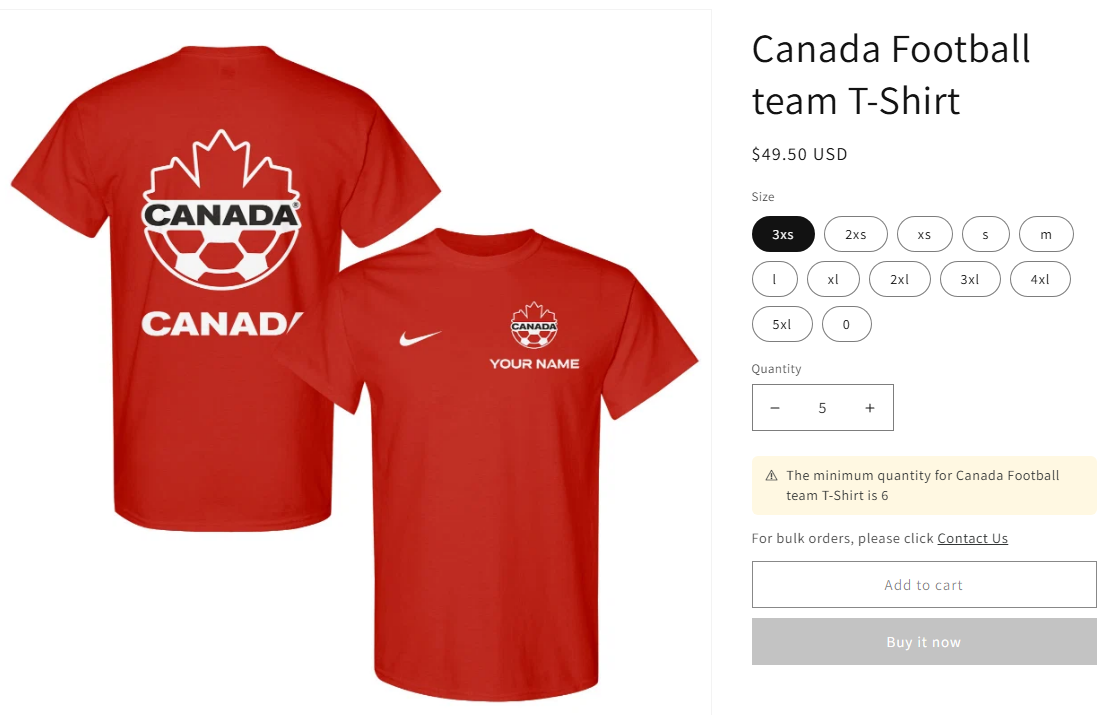
Prime MOQ rules are enforced by a Shopify Function that runs as part of Shopify's own checkout validation, for every eligible cart. That is why a customer cannot get around a limit by disabling JavaScript, editing the DOM, or using a direct checkout link. The storefront message is a separate, purely informational layer that warns before the shopper gets that far.
- Two layers: a storefront message that warns, and a checkout Function that blocks.
- Turning off the app embed hides the warning. It does not disable enforcement.
- There is no warning-only mode. An active rule always blocks when its condition fails.
- To stop enforcement temporarily, deactivate the rule.
Inside the app
Real screens from Prime MOQ · Order Limits.
What you get
Server-side by construction
The Function runs inside Shopify's checkout, independently of your theme, so theme changes cannot weaken it.
Permalink and quick-buy safe
Direct checkout links, Buy Now and drawer carts all pass through the same validation.
Warning layer is optional but valuable
Without the app embed, shoppers are blocked at checkout with no earlier explanation, which costs conversions.
Blocked attempts are counted
The Rules list shows all-time blocked attempts per rule, and the Dashboard shows a rolling seven-day view.
How it works
- 1Save an active rule. Its conditions, counting mode, product scope and eligibility are resolved into a checkout validation.
- 2At checkout the Function evaluates the cart against every rule matching at least one line item.
- 3If a condition fails, checkout is rejected with your configured message.
- 4Enable the app embed so the same limit is explained earlier on the product page and in the cart.
- 5Watch Blocked attempts in the Rules list to confirm a rule is actually doing something.
The two layers
The split between warning and enforcement is deliberate. A merchant who accidentally leaves the app embed off still has working enforcement, just without the friendly warning.
| Layer | What it does |
|---|---|
| Storefront message | Warns the shopper before checkout, on the product page and cart. Purely UI |
| Checkout Function | Blocks the order server side inside Shopify's checkout. Cannot be bypassed |
Blocked attempts and analytics
The Rules list carries an all-time Blocked attempts column per rule, while the Dashboard's Last 7 days card shows the same kind of number across the whole store. Both are read-only reporting, aggregate only, and neither affects enforcement. Zero blocked attempts does not mean a rule is broken, it may simply not have been tested yet.
Common mistakes
- Expecting a warning-only mode. An active rule always blocks when its condition fails.
- Disabling the app embed to "pause" a rule. Deactivate the rule instead.
- Comparing the Rules list column with the Dashboard card. They use deliberately different windows.
Frequently asked questions
- Can a shopper bypass a limit with a direct checkout link?
- No. The Function runs inside Shopify's checkout validation, so links, drawer carts and Buy Now all go through the same check.
- How do I temporarily stop a rule from enforcing?
- Deactivate the rule, or give it an end date. Turning off the app embed only hides the storefront warning.
Best for
Stores using quick-buy, bundles or shared cart links.
Want a walkthrough of this rule?
We'll set it up live on your catalog in 30 minutes.