 Install on Shopify
Automations & Shopify Flow
Turn a blocked order into a workflow, or let Flow adjust your rules automatically.
Short answer
Automations connect Prime MOQ to Shopify Flow so a block stops being a dead end. Every time a rule blocks a checkout or a repurchase limit is reached, Prime MOQ can emit an event that Flow listens to, and Flow can call back into Prime MOQ to change a rule's limit, switch a rule on or off, or reset a customer's repurchase counter. Four ready-made workflows ship with the app already wired, so you install one instead of building from a blank canvas. Flow never enforces anything itself: your rules are enforced at checkout on every plan, with or without Flow. What Flow adds is what happens around a block, and rules that change themselves.
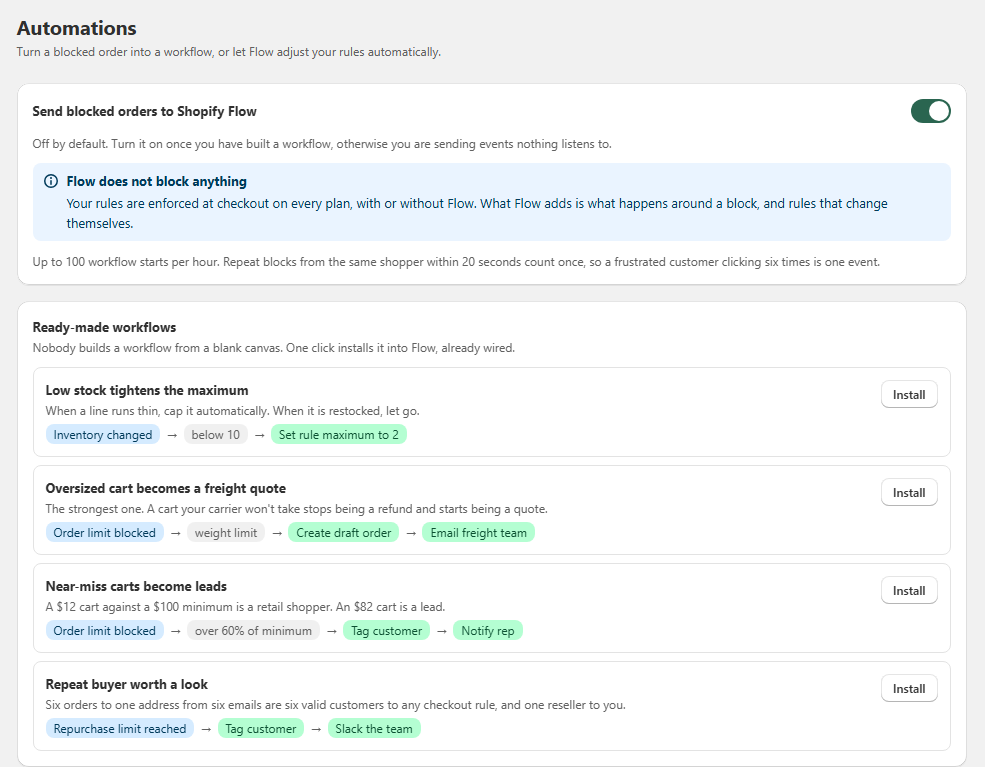
- Off by default. Turn on Send blocked orders to Shopify Flow once you actually have a workflow listening.
- Two triggers: Order limit blocked a customer, and Repurchase limit reached.
- Three actions Flow can run on Prime MOQ: set a rule's limit, enable or disable a rule, reset a customer's repurchase counter.
- Four ready-made workflows install into Flow with one click, already wired.
- Flow does not block anything. Enforcement stays in Prime MOQ at checkout, on every plan.
- Up to 100 workflow starts per hour, and repeat blocks from the same shopper within 20 seconds count once.
Inside the app
Real screens from Prime MOQ · Order Limits.
What you get
Events worth acting on
A block carries the rule, the limit type, attempted versus allowed, the cart total, the product and the customer when known, so your workflow has enough to make a decision.
Rules that change themselves
Flow can write back to Prime MOQ: raise or lower a limit, enable or disable a rule, or clear a repurchase counter for one customer.
One-click ready-made workflows
Low stock tightens the maximum, oversized cart becomes a freight quote, near-miss carts become leads, and repeat buyers worth a look.
Sensible throttling
A frustrated shopper clicking six times is one event, not six, and the app caps starts at 100 per hour so Flow is never flooded.
How it works
- 1Open Automations in Prime MOQ and turn on Send blocked orders to Shopify Flow.
- 2Install one of the ready-made workflows, or build your own in Shopify Flow starting from a Prime MOQ trigger.
- 3A shopper hits a limit at checkout. Prime MOQ blocks the order and emits the event with its full context.
- 4Flow evaluates your conditions, for example cart value over 60 percent of the minimum, or a weight limit block.
- 5Flow runs its actions: tag the customer, create a draft order, email the freight team, notify Slack, or call back into Prime MOQ to change a rule.
- 6The next shopper is enforced against the updated rule, with no manual work from you.
What Prime MOQ adds to Flow
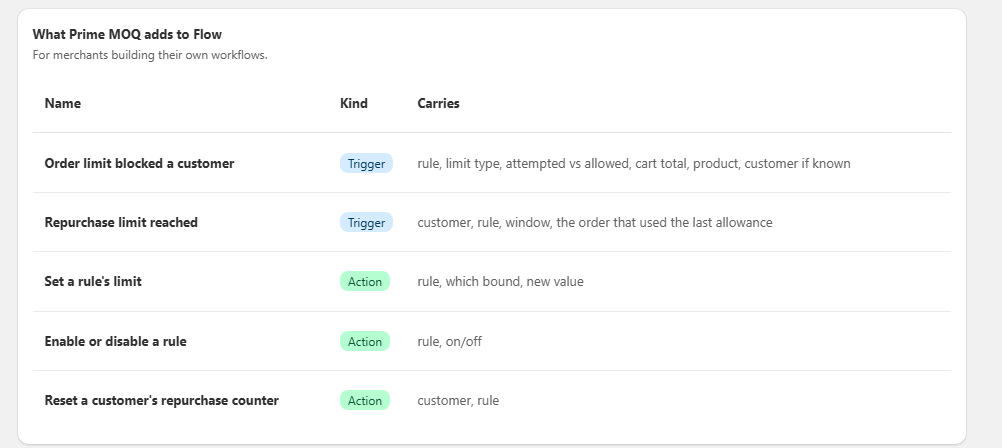
These are the triggers and actions the app registers in Shopify Flow. Use them as building blocks for any workflow you want, alongside every other Flow connector your store has.
| Trigger or action | What it carries |
|---|---|
| Order limit blocked a customer (trigger) | Rule, limit type, attempted versus allowed, cart total, product, and the customer if known. |
| Repurchase limit reached (trigger) | Customer, rule, window, and the order that used the last allowance. |
| Set a rule's limit (action) | Rule, which bound to change, and the new value. |
| Enable or disable a rule (action) | Rule, and on or off. |
| Reset a customer's repurchase counter (action) | Customer and rule. |
The four ready-made workflows
Nobody builds a workflow from a blank canvas. Each of these installs into Flow already wired, and you can edit it afterwards like any other Flow workflow.
| Workflow | What it does |
|---|---|
| Low stock tightens the maximum | Inventory changed, below 10, set rule maximum to 2. When a line runs thin it caps itself, and when it is restocked you let go. |
| Oversized cart becomes a freight quote | Order limit blocked on a weight limit, create a draft order, email the freight team. A cart your carrier will not take stops being a refund and starts being a quote. |
| Near-miss carts become leads | Order limit blocked at over 60 percent of the minimum, tag the customer, notify a rep. A 12 dollar cart against a 100 dollar minimum is a retail shopper. An 82 dollar cart is a lead. |
| Repeat buyer worth a look | Repurchase limit reached, tag the customer, message the team in Slack. Six orders to one address from six emails are six valid customers to any checkout rule, and one reseller to you. |
Flow does not block anything
This is the most important thing to understand before you switch Automations on. Your limits are enforced by Prime MOQ at checkout whether or not Flow exists, and whether or not your store has Flow installed. Automations only decide what happens around a block: who gets tagged, who gets emailed, which rule adjusts itself next. If a workflow is paused or fails, your limits still hold.
Rate limits and de-duplication
Blocks can be noisy, so the app protects your Flow quota for you.
- Up to 100 workflow starts per hour from Prime MOQ triggers.
- Repeat blocks from the same shopper within 20 seconds are counted as one event.
- A shopper clicking Checkout six times in frustration produces one workflow run, not six.
- Events are only emitted while the Send blocked orders to Shopify Flow toggle is on.
Ideas beyond the ready-made set
Once the triggers are available in Flow, the patterns are up to you.
- Move a customer who is repeatedly blocked into a wholesale segment automatically.
- Disable a seasonal rule at the end of a promotion without touching the admin.
- Reset a repurchase counter for a customer after a support conversation.
- Log every block into a Google Sheet or a data warehouse for demand analysis.
- Raise a maximum automatically when a restock lands, then lower it again when stock drops.
Common mistakes
- Turning the toggle on before any workflow exists, so you are sending events nothing listens to.
- Expecting Flow to enforce a limit. Enforcement is always Prime MOQ at checkout.
- Assuming a paused or failed workflow disables your rules. It does not, the limits still apply.
- Building a workflow that writes a rule limit in a loop, for example an action that re-triggers its own condition.
- Reading a burst of blocks from one shopper as many customers. Repeat blocks within 20 seconds are one event.
Frequently asked questions
- Do I need Shopify Flow to use Prime MOQ?
- No. Every limit is enforced at checkout without Flow. Automations are an optional layer for what happens around a block.
- Is Automations available on the free plan?
- Rule enforcement is unlimited and free. Flow triggers, actions and the ready-made workflows are part of the Pro feature set.
- Can Flow change my rules automatically?
- Yes. Three actions let Flow set a rule's limit, enable or disable a rule, and reset a customer's repurchase counter, so rules can react to inventory, seasons or support decisions.
- Can I edit a ready-made workflow after installing it?
- Yes. It is installed as a normal Shopify Flow workflow, so you can change conditions, add steps or swap the actions for your own tools.
- What happens if I hit the hourly limit?
- Additional starts within that hour are not sent to Flow. Enforcement is unaffected, only the automation events are throttled.
Best for
Merchants who want a blocked order to create a lead, a freight quote or a rule change instead of ending in silence.
Want a walkthrough of this rule?
We'll set it up live on your catalog in 30 minutes.