 Install on Shopify
Customer Eligibility & Countries
Different limits for retail, VIP, wholesale and distributors.
Short answer
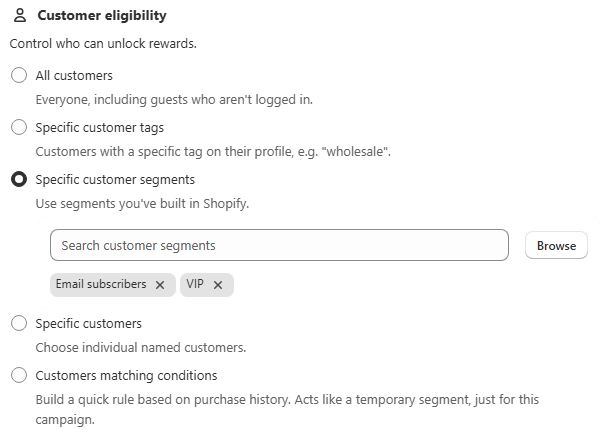
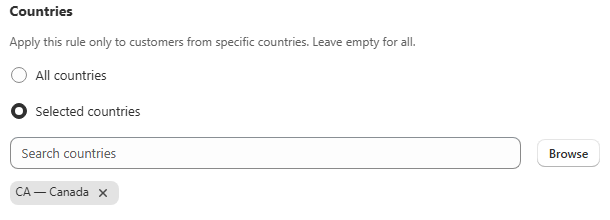
Customer eligibility decides who a rule applies to. By default every rule applies to all customers, including guests, and it can be narrowed to a customer tag, a Shopify segment, named customers, or a purchase-history condition. A separate Countries field restricts the rule to shoppers from selected countries, which suits freight-driven weight rules and region-specific wholesale minimums.
- All customers is the default, and it includes guests who are not logged in.
- Scoping to a wholesale tag is the standard way to keep a B2B minimum away from retail shoppers.
- Purchase-history conditions and repurchase checks both need a logged-in customer.
- Switching back to All countries clears the country list you had picked.
Inside the app
Real screens from Prime MOQ · Order Limits.
What you get
Specific customer tags
Match customers carrying a tag such as wholesale, vip or distributor. This is the most common option.
Shopify segments
Reuse any segment you have already built in Shopify instead of maintaining a parallel tag system.
Named customers and conditions
Target individual accounts, or build a purchase-history condition such as number of orders greater than zero.
Country restriction
Selected countries applies the rule only where it makes sense, for example a freight minimum in one shipping zone.
How it works
- 1Open the Customer eligibility card in the rule editor.
- 2Choose the match type, usually Specific customer tags.
- 3Enter the tags, segments or customers the rule should apply to.
- 4Leave Countries on All countries, or switch to Selected countries and pick them from the country picker.
- 5Save, then test with an account that carries the tag and one that does not.
Every eligibility option
The Customer eligibility card decides who the rule applies to, independently of which products it covers.
| Option | Matches |
|---|---|
| All customers | Everyone, including guests who are not logged in |
| Specific customer tags | Customers carrying a chosen tag, such as wholesale |
| Specific customer segments | Any segment already built in Shopify |
| Specific customers | Individually named customers |
| Customers matching conditions | A purchase-history condition built into the rule |
Use eligibility instead of a second rule
Only one rule governs a product at a time, so you cannot stack a tighter retail rule and a looser wholesale rule on the same products. Narrow who the single rule applies to with eligibility, and leave the other group unrestricted.
Common mistakes
- Relying on a purchase-history condition for guests, who have no history to evaluate.
- Creating two overlapping rules for two groups instead of scoping one rule by tag.
- Switching to All countries and losing the country selection you had built.
Frequently asked questions
- Do guests count as All customers?
- Yes. All customers includes shoppers who are not logged in, which is why a B2B minimum needs an explicit tag or segment.
- Can one rule have both a tag and a country restriction?
- Yes. Eligibility and Countries are separate fields on the same rule and are applied together.
Best for
Stores serving retail and wholesale from a single Shopify store.
Want a walkthrough of this rule?
We'll set it up live on your catalog in 30 minutes.